
Healthcare websites have a problem most industries don’t. A slow e-commerce site loses a sale. A slow clinic website loses a patient who might wait months for an appointment — and probably just Googled a competitor while yours was loading.
Technical SEO in healthcare isn’t just about rankings. It’s about whether patients can find you before they give up and call whoever shows up first.
This guide covers 15 specific technical fixes that move the needle for hospitals, clinics, and private practices. Not theory. Actual things to check and change.
What Is Technical SEO for Healthcare Websites?
Technical SEO for healthcare websites is the process of optimizing site infrastructure — including crawlability, page speed, mobile responsiveness, HTTPS security, structured data (MedicalCondition, Physician, and FAQPage schema), and HIPAA-compliant indexing — so search engines and AI systems can reliably discover, access, and cite authoritative medical content.
For healthcare, this matters more than it does in other industries. Google classifies medical, health, and financial content as YMYL — “Your Money or Your Life.” These are pages where bad information causes real harm. As a result, Google applies stricter quality signals here. A dental clinic with thin content and poor site structure will struggle against a well-built competitor even if their services are identical.
Google’s E-E-A-T framework (Experience, Expertise, Authoritativeness, Trustworthiness) also weighs heavily on healthcare sites. Technical SEO supports E-E-A-T by making your site crawlable, secure, fast, and structurally sound — the baseline before content quality even enters the picture.
Why Healthcare Websites Lose Organic Patient Traffic
Most healthcare sites losing organic traffic have the same cluster of problems:
- Pages load in 4–6 seconds on mobile (industry average is closer to 8)
- No mobile-optimized appointment booking flows
- Doctor profile pages are thin, duplicated, or blocked from crawling
- Location pages have identical content swapped for city names
- HTTPS issues or mixed content warnings
- Missing or broken schema markup
- Internal linking that doesn’t connect services to each other
None of these are hard to fix. They just require someone to actually look for them.
Your Patients Are Searching Online. Can They Find You?
With data-driven Healthcare SEO Services, we help healthcare websites rank higher, improve technical SEO, and attract more patient appointments organically.
Get affordable SEO Services Contact Us
Fix #1: Page Speed
Slow pages lose patients before they see your content. According to Google, 53% of mobile users abandon a page that takes longer than 3 seconds to load. For healthcare sites, where patients are often anxious and looking for fast answers, that number is probably higher.
Where to start:
- Compress images. JPEG files on healthcare sites often aren’t compressed at all. A 4MB banner image serves no one.
- Convert images to WebP format. It’s 25–35% smaller than JPEG at equivalent quality and supported by all modern browsers.
- Enable lazy loading so images below the fold load only when needed.
- Remove unused JavaScript. Run Google PageSpeed Insights and look at the “Eliminate render-blocking resources” section.
- Check your hosting. Shared hosting with 800ms server response times will cap what you can achieve regardless of other optimizations.
Tools: Google PageSpeed Insights, GTmetrix, WebPageTest
Fix #2: Mobile Optimization
Since 2019, Google has used mobile-first indexing for all sites. That means it crawls and evaluates the mobile version of your pages — not the desktop version — to determine rankings.
Most clinic websites were originally built for desktop. The mobile experience gets tacked on after the fact, and it shows.
What to check:
- Is your appointment booking form usable on a phone? Test it yourself. Can you complete a booking in under 2 minutes on mobile without pinching and zooming?
- Do you have a click-to-call button? Patients searching on mobile expect to tap a phone number and call, not copy-paste it.
- Does your navigation work on small screens? Hamburger menus that require precision tapping will frustrate users on older phones.
- Are fonts readable without zooming? 16px minimum for body text.
If your mobile conversion rate is dramatically lower than desktop, that’s a sign your mobile UX has real problems.
Fix #3: Core Web Vitals
Core Web Vitals are Google’s three performance metrics that directly affect rankings. They measure what the experience of loading your page actually feels like — not just whether it technically loads.
| Metric | What It Measures | Good Threshold |
|---|---|---|
| LCP (Largest Contentful Paint) | How long until main content appears | Under 2.5 seconds |
| INP (Interaction to Next Paint) | How fast the page responds to clicks | Under 200ms |
| CLS (Cumulative Layout Shift) | How much content jumps around while loading | Under 0.1 |
Healthcare websites commonly fail CLS because images and banner ads load after the text, pushing content down mid-read. That’s jarring and Google penalizes it.
Check your Core Web Vitals in Google Search Console under “Experience → Core Web Vitals.” Field data from real users is more actionable than lab data.
Fix #4: URL Structure
URL structure affects both crawlability and user trust. Patients seeing a URL like /page?id=8432&ref=specialty&doc=true are less likely to trust or share it than /services/cardiology/dr-james-peterson.
Recommended structure for healthcare sites:
/services/[specialty]/
/doctors/[doctor-name]/
/locations/[city-name]/
/blog/[topic]/[article-slug]/
Rules:
- Use hyphens, not underscores
- Keep URLs lowercase
- Avoid unnecessary parameters where possible
- Doctor profile URLs should include the doctor’s name, not just an ID
Dynamic URLs generated by some healthcare CMS platforms (booking systems especially) can cause indexing problems. If your CMS generates ugly parameter-heavy URLs for service pages, check whether clean URL rewrites are available.
Fix #5: Crawlability
If Googlebot can’t reach your pages, nothing else matters. A page that isn’t crawled isn’t indexed. A page that isn’t indexed doesn’t rank.
Common crawlability issues on healthcare sites:
- Doctor profiles blocked in
robots.txtbecause they were considered internal - Appointment booking pages disallowed from crawling (fine — these shouldn’t be indexed, but confirm they’re not leaking PageRank)
- XML sitemaps that haven’t been updated since a site redesign
- Orphaned pages — service pages with no internal links pointing to them
Check your XML sitemap. Is it actually current? Submit it in Google Search Console and look for errors. Then crawl your own site with Screaming Frog and look for pages returning 404 or pages with no inbound internal links.
Crawl budget is real for large hospital systems. If Google is spending crawl budget on faceted URL variations and session-based parameters, it’s spending less time on the important pages.
Fix #6: Schema Markup
Schema markup is structured data that tells search engines (and AI systems) what your content means, not just what it says. Healthcare sites that use it correctly get richer search results and are more likely to be cited in AI-generated answers.
Key schema types for healthcare:
| Schema Type | Use For |
|---|---|
Physician |
Individual doctor profiles |
MedicalClinic |
Clinic location pages |
Hospital |
Hospital-level pages |
FAQPage |
FAQ sections on service pages |
Review / AggregateRating |
Patient reviews |
MedicalCondition |
Condition information pages |
Most healthcare sites have none of this. Implementing even Physician and MedicalClinic schema puts you ahead of most competitors.
For AI search specifically: schema helps AI systems like Google AI Overviews, ChatGPT (with search), and Perplexity understand who your doctors are, what you treat, and where you’re located. Content with proper schema shows 30–40% higher AI visibility according to research from Princeton GEO (2024).
Validate your schema at schema.org/validator and Google’s Rich Results Test.
Fix #7: Indexing
Ranking first requires being indexed. This sounds obvious, but indexing problems are more common than most clinics realize.
Things to check:
- Search
site:yourdomain.comin Google. How many pages are indexed? Does it match how many you expect? - Open Google Search Console. Are there pages with “Crawled — currently not indexed” status? That’s Google saying it found the page but decided not to include it — usually because the content is thin or duplicated.
- Look for accidental
noindextags. These sometimes get left on pages after development and staging. - Check canonical tags. If your CMS generates multiple URL variations for the same page (e.g., with and without trailing slashes), the canonical tag should point to the preferred version.
Treatment and specialty pages with thin content are common indexing casualties. If your Orthopedics page has 150 words and no unique information, Google may index it briefly and then drop it.
Fix #8: HTTPS
If your healthcare website is still on HTTP, fix this today. Not for rankings (though HTTPS is a confirmed Google ranking signal) — for patient trust.
A browser showing “Not Secure” in the address bar next to a contact form asking for personal health information is a conversion killer. Patients notice this.
What to check:
- Is your SSL certificate current and valid? Expired certificates cause browser warnings.
- Do you have mixed content? This happens when a site has HTTPS but loads images or scripts over HTTP. Browsers block mixed content, which can break page elements.
- Do HTTP URLs redirect to HTTPS? Set up a 301 redirect at the server level.
HIPAA doesn’t technically require HTTPS for public-facing websites (only for transmitting patient health information), but patients apply HIPAA-like expectations to healthcare sites regardless of the legal standard. A non-HTTPS healthcare site signals carelessness.
Fix #9: Internal Linking
Internal links do two things: they pass authority through your site, and they tell Google which pages are important. Most healthcare websites under-invest in both.
Common missed opportunities:
- Blog posts about symptoms or conditions rarely link to the relevant treatment pages. A post about “Signs of heart disease” should link to your Cardiology service page.
- Specialty pages don’t link to each other, even when services are related (e.g., Orthopedics → Sports Medicine → Physical Therapy).
- Location pages don’t link to the doctors serving that location.
- The homepage links to top-level sections, but nothing deeper.
A flat internal link structure means PageRank pools at the top of your site and never flows to individual doctor profiles or specific condition pages — exactly the pages you want to rank for competitive local searches.
Practical rule: Every piece of content you publish should contain at least 2–3 internal links to relevant service or specialty pages.
Fix #10: Duplicate Content
Duplicate content is a real problem for healthcare organizations, especially those with multiple locations.
Where it shows up:
- Location pages that say “We provide family care in [City]” with only the city name swapped between 12 nearly-identical pages
- Doctor profile pages where the bio is a template with names changed
- Treatment descriptions syndicated from a content provider (insurance companies, for example, often supply this)
Google won’t penalize you for having some duplicate content, but it will choose to index one version and ignore the others. If you have 12 location pages and Google only indexes 3, you’re not ranking in the other 9 cities.
Fix: Make each location page genuinely different. Include information specific to that office — the doctors who practice there, the local community they serve, directions and parking, patient reviews from that location. This isn’t just SEO — it’s actually useful for patients.
For treatment pages: if you bought syndicated content, rewrite it. Thin, duplicated medical content is a ranking ceiling.
Fix #11: Local Technical SEO
Most healthcare search is local. Patients aren’t searching for “best cardiologist” — they’re searching for “cardiologist near me” or “cardiologist [city name].”
Local SEO checklist:
- NAP consistency — Name, Address, Phone number must be identical across your website, Google Business Profile, Yelp, Healthgrades, and any other directory listings. Even minor variations (“St.” vs “Street”) create inconsistencies that erode trust signals.
- Location schema —
MedicalClinicorHospitalschema with your full address, phone, coordinates, and hours - Hreflang — If you serve multiple language communities, implement hreflang tags so Spanish-speaking patients see Spanish-language pages
- Google Business Profile — Keep it updated. Hours, services, photos. Inconsistencies between your GBP and your website confuse both patients and Google.
If you have multiple locations, create a separate, unique page for each one. Don’t use a single page with a dropdown.
Fix #12: Image SEO
Healthcare websites are image-heavy — facility photos, doctor headshots, procedure illustrations. Few optimize any of them.
What to fix:
- Alt text — Every image needs descriptive alt text. “Dr. Sarah Chen, cardiologist at Riverside Heart Center” is useful. “image-001.jpg” is not. Alt text helps visually impaired users and helps Google understand what’s in the image.
- File names — Rename images before uploading.
dr-sarah-chen-cardiologist.jpgis better thanIMG_4521.jpg. - Compression — Aim for under 200KB per image. Most healthcare site images haven’t been compressed since they were uploaded.
- Image sitemap — Include images in your XML sitemap so Google can discover and index them through image search.
Doctor headshots in particular drive search traffic through image search and Google Knowledge Panels. Name them correctly, compress them, and add proper alt text.
Fix #13: Redirect Management
Every time you rename a page, delete a doctor’s profile, or redesign your site, you create the potential for broken links and lost rankings. Healthcare sites often have years of accumulated redirect debt.
Common problems:
- Redirect chains — Redirect A → B → C → D. Each hop loses a small amount of PageRank and slows page load. Audit and flatten chains to go directly A → D.
- Redirect loops — A redirects to B which redirects back to A. Browser shows an error, Googlebot gives up.
- 302 instead of 301 — 302 is a temporary redirect. If you permanently moved a page, use 301. A 302 tells Google the original URL will come back, so it keeps the old URL in the index instead of passing authority to the new one.
- Broken appointment pages — These are the most damaging. If a patient clicks “Book Appointment” and hits a 404, they’re gone.
Run a full redirect audit with Screaming Frog every time you make significant site changes. It takes an hour and catches things that would otherwise cost you rankings for months.
Fix #14: Website Architecture
How your site is structured affects how Googlebot explores it and how patients navigate it. Deep, complicated hierarchies mean important pages are buried.
The goal is a flat structure — most pages reachable within 3 clicks from the homepage.
Good architecture for a multi-specialty clinic:
Homepage
├── Services
│   ├── Cardiology
│   ├── Orthopedics
│   └── Pediatrics
├── Doctors
│   ├── Dr. James Peterson (Cardiology)
│   └── Dr. Maria Rodriguez (Orthopedics)
├── Locations
│   ├── Downtown
│   └── North Campus
└── Patient Resources
    ├── Blog
    └── Insurance
Bad architecture: Departments > Specialties > Sub-specialties > Conditions > Treatments > Doctors. Pages five levels deep rarely rank for competitive terms.
If you have a large hospital system with hundreds of pages, consider a hub-and-spoke model where each department page functions as a hub linking to all specialty and doctor pages within it.
Fix #15: AI Search Optimization
This is the newest item on the list and probably the fastest-changing one. Google AI Overviews now appear in roughly 45% of searches. ChatGPT and Perplexity are where a growing number of patients go first.
If your content isn’t structured for extraction, AI systems won’t cite it — even if it ranks on page one.
What “AI search optimized” means for healthcare:
- Lead with direct answers. Don’t bury the answer three paragraphs in. AI systems extract the answer, not the buildup.
- Use question-based headings. “What is a coronary angiogram?” is more extractable than “Coronary Angiogram Information.”
- Add statistics with sources. According to Princeton GEO research (KDD 2024), citing authoritative sources increases AI visibility by 40%. Numbers and citations are signals of credibility.
- Write answer blocks of 40–60 words. That’s the sweet spot for AI snippet extraction.
- Implement FAQ schema. FAQPage structured data is one of the most reliable ways to appear in AI-generated answers.
- Allow AI bots in robots.txt. Check that GPTBot, PerplexityBot, ClaudeBot, and Google-Extended are not blocked. If they are, those platforms can’t cite you.
Entity-based SEO matters here too. Google’s Knowledge Graph and AI systems understand entities — doctors, clinics, medical conditions, treatments. When your Physician schema correctly identifies Dr. Peterson as a cardiologist at Riverside Heart Center who treats atrial fibrillation, you’re building entity associations that carry weight in AI-generated answers.
The long-term play: healthcare practices that build strong AI search visibility now will be harder to displace than those who optimize for it after competitors already own the citations.
Tools to Analyze Technical SEO for Healthcare Websites
| Tool | Best For |
|---|---|
| Google Search Console | Indexing, crawl errors, Core Web Vitals field data |
| Google PageSpeed Insights | Speed and Core Web Vitals lab data |
| Screaming Frog | Full site crawl, redirect audits, broken links |
| Ahrefs | Backlinks, crawl errors, competitor analysis |
| Semrush | Technical audit, AI Overview tracking, local SEO |
| GTmetrix | Page speed waterfall analysis |
| Schema Validator | Testing structured data |
| Rich Results Test | Previewing how schema appears in search |
Start with Google Search Console. It’s free, it uses actual Google data, and it will surface the issues that matter most to your rankings.
Also Know The Difference Between Healthcare SEO and General SEO
Technical SEO Mistakes Healthcare Websites Make Most
- Publishing location pages that are 95% identical across all cities
- Not compressing images before uploading (causes slow load times indefinitely)
- Leaving staging site
noindextags active after launching the real site - Using 302 redirects when 301s are correct
- Ignoring mobile — testing only on desktop because that’s where staff access the site
- Having no schema markup at all
- Blocking AI crawlers without realizing it
- Building internal links only to the homepage and top-level service pages
- Letting SSL certificates expire
- Not updating the XML sitemap after removing or adding pages
Most of these aren’t intentional. They accumulate over time as sites grow and staff turn over. A quarterly technical SEO audit catches them before they compound.
How Technical SEO Converts to Patient Appointments?
Technical SEO converts to patient appointments by making your clinic discoverable when patients search for care. Fast page speed reduces bounce rates, mobile optimization captures on-the-go searchers, schema markup surfaces your services in AI Overviews, and clean site architecture helps search engines index appointment pages — turning organic visibility directly into booked consultations.
A patient searching “knee pain specialist near me” won’t call a clinic they can’t find on page one. If they do find it, they won’t book if the mobile form is broken. If the form works, they still might leave if the page takes 8 seconds to load or a browser shows “Not Secure.”
Every fix in this guide removes one more barrier between a patient and a booked appointment. That’s what makes technical SEO worth the investment — it’s not traffic for its own sake. It’s removing friction for patients who are already looking for you.
The practices with the best patient acquisition aren’t necessarily the ones doing the most marketing. They’re often the ones whose websites just work.
Frequently Asked Questions
Q.1 What is technical SEO in healthcare?
Technical SEO in healthcare refers to the structural and code-level optimizations that help search engines crawl, index, and rank a healthcare website. This includes page speed, mobile usability, schema markup, URL structure, HTTPS, and fixing crawlability issues. Because healthcare sites fall under Google’s YMYL classification, technical foundations have an outsized effect on rankings.
Q.2 Why is technical SEO important for hospitals?
Hospitals and large healthcare systems have hundreds or thousands of pages. Without proper technical SEO, important pages — specialist profiles, service lines, location pages — get missed by Googlebot, fail to rank, or rank for the wrong queries. Technical SEO ensures the pages you want found are the ones Google actually indexes.
Q.3 How does schema markup help healthcare websites?
Schema markup gives search engines and AI systems structured context about who your doctors are, what conditions you treat, where you’re located, and what patients say about you. It can trigger rich search results (star ratings, FAQ dropdowns) and increases the likelihood of being cited in AI-generated answers. Healthcare-specific schema types include Physician, MedicalClinic, Hospital, and MedicalCondition.
Q.4 What are Core Web Vitals in healthcare SEO?
Core Web Vitals are three Google metrics: LCP (Largest Contentful Paint), INP (Interaction to Next Paint), and CLS (Cumulative Layout Shift). They measure how fast content loads, how responsive the page is to interaction, and how stable the layout is. Google uses them as ranking signals. Healthcare sites commonly fail CLS because ads and images load after text, causing the page to jump.
Q.5 How can healthcare websites improve local SEO?
Local SEO for healthcare requires consistent NAP (Name, Address, Phone) across all directories, properly structured location pages (one unique page per location), MedicalClinic schema with full address and hours, an updated Google Business Profile, and internal links connecting doctors to their locations. Avoid location pages with near-identical content.
Q.6 What is GEO optimization in healthcare SEO?
GEO (Generative Engine Optimization) is the practice of structuring content so AI systems like Google AI Overviews, ChatGPT, and Perplexity can extract and cite it. For healthcare sites, this means using direct answer formats, question-based headings, FAQ schema, cited statistics, and allowing AI crawlers in robots.txt. It’s increasingly important as AI-generated answers replace traditional search results for health queries.
Q.7 Which technical SEO tool is best for hospitals?
Google Search Console is the most important tool because it shows real crawling and indexing data from Google itself. For deeper audits, Screaming Frog handles full site crawls and redirect analysis. Semrush or Ahrefs provide broader technical audit features and competitive data. For page speed specifically, Google PageSpeed Insights and GTmetrix give actionable diagnostics.
Q.8 How often should healthcare websites run SEO audits?
Run a technical SEO audit at minimum quarterly. Run one immediately after any significant site change — redesigns, CMS migrations, adding new location pages, or changing URL structures. These changes commonly break redirects, create duplicate content, or accidentally introduce noindex tags. Catching problems within days beats discovering them after months of lost rankings.
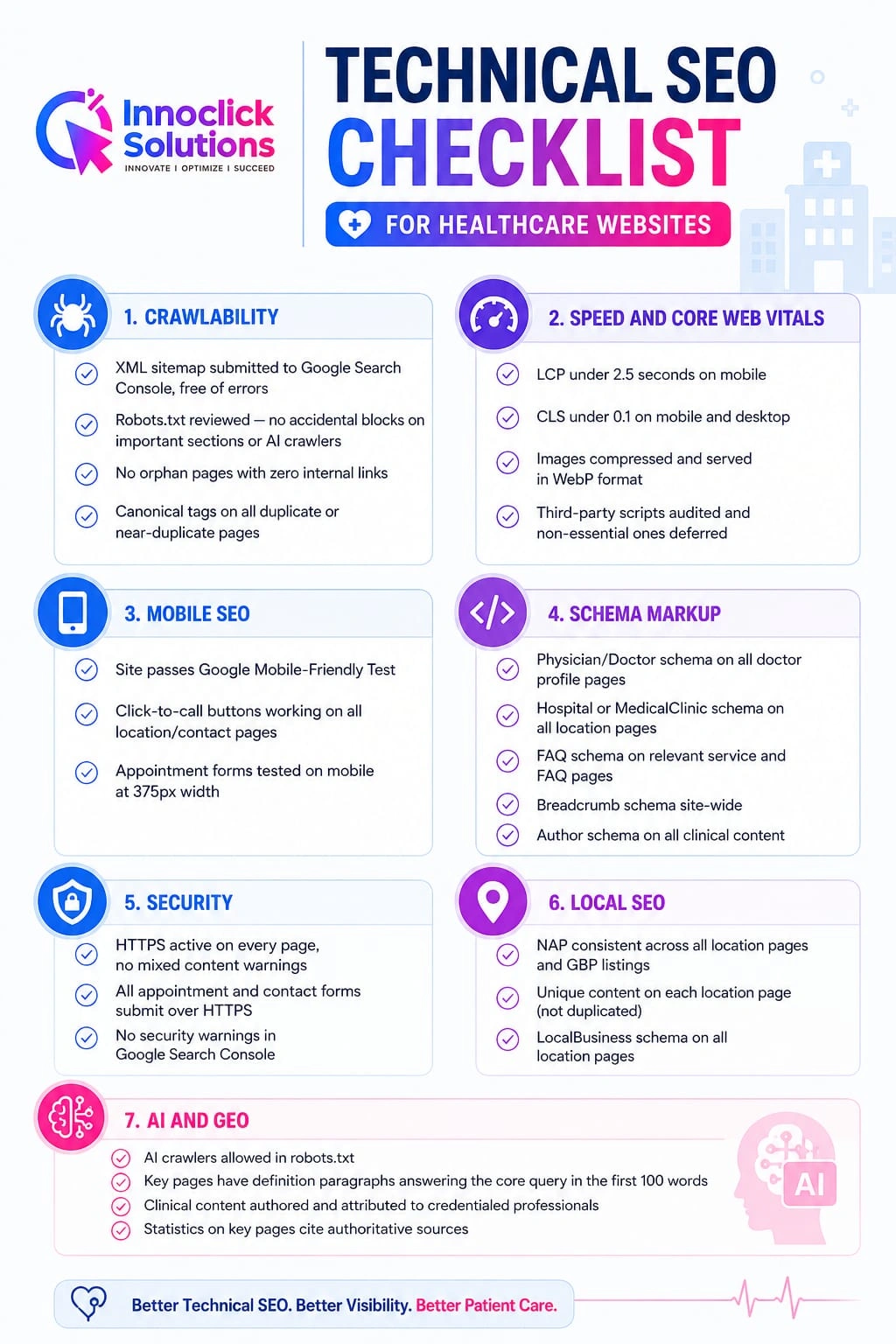
Technical SEO Checklist for Healthcare Websites

Shivraaj Dhaygude is a Pune-based SEO Specialist with over 6+ years of hands-on experience helping local businesses dominate Google Search and AI-powered results. He specializes in Local Pack optimization, Google AI Overview visibility, and Generative Engine Optimization (GEO) — an emerging discipline focused on appearing inside AI-generated search answers.
Shivraaj has personally led SEO campaigns for 50+ SMBs across Pune and Maharashtra, consistently delivering top-3 local pack rankings and measurable increases in organic leads. His approach combines technical SEO foundations with AI search readiness strategies, giving clients a competitive edge as search evolves.
He writes about local SEO, GEO, and AI search trends based on real client data and ongoing experimentation — not theory.